Available 24/7
Email geoiptvresellers@gmail.com Telegram GeoiptvResellers

Available 24/7
Email geoiptvresellers@gmail.com Telegram GeoiptvResellers

How to Use Geo IPTV Reseller Panel – beginner Guide

Learn How to Use Geo IPTV Reseller Panel , Managing IPTV customers has never been easier. Our Geo IPTV Reseller Panel is designed to give resellers full control with simple navigation, instant activation, and a smart credit-based system. This guide explains every feature and how you can use the panel effectively—even with zero experience. watch pricing plan at geo iptv


🚀 What Is the Geo IPTV Reseller Panel?

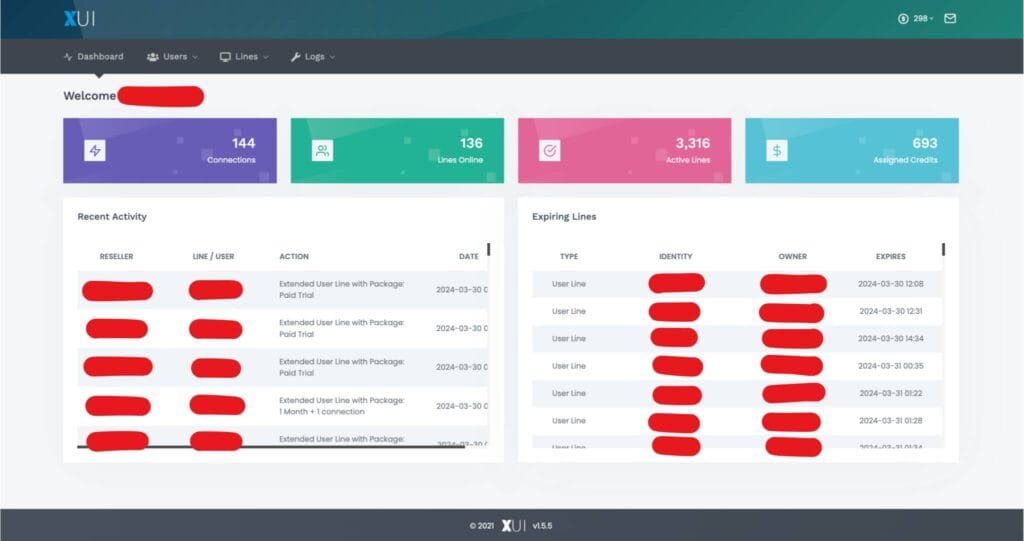
The Geo IPTV Reseller Panel is a powerful dashboard where you can:

  • Create IPTV accounts for customers
  • Manage users, expiration dates, and connections
  • Monitor credit usage
  • Add lines, renew packages, and upgrade plans
  • Generate MAG, Enigma, M3U, and Xtream Codes accounts
  • Top up more credits anytime

It is fully beginner-friendly, and requires no technical experience.

🔑 1. How To Use Geo IPTV Reseller Panel

How to use geo iptv reseller

Log in with Your Geo IPTV Panel We Provided:

Once you purchase your reseller plan, you will receive:

  • Reseller Login URL
  • Username
  • Password

Steps to log in:

  1. Open the reseller portal link provided.
  2. Enter your login details.
  3. You will be redirected to the Dashboard, where all tools are available.

💳 2. Understanding Credits (Most Important)

Credits are the currency of your reseller panel. Each time you activate a subscription for a customer, credits are deducted.

Credit rules:

  • 1 Month = 1 Credit watch at home page for full details
  • Longer plans use more credits
  • Additional connections increase credit cost
  • Credits never expire
  • No refunds on credits

A full pricing grid will be shown inside your panel.


👤 3. Creating a New IPTV User

This is the most commonly used feature.

Steps:

  1. Go to “Create User / Add Line”
  2. Enter customer details:
    • Username
    • Password
    • Duration (1/3/6/12/24 months)
    • Connections (1–5)
  3. Choose output format:
    • M3U
    • MAG
    • Enigma
    • Xtream Codes
  4. Click Create Account

The user will be activated instantly and credits will be deducted automatically.


🔄 4. Renewing an Existing User

If a customer wants more months:

  1. Go to “Users List”
  2. Search username
  3. Select “Add plan”
  4. Choose new months
  5. Confirm to deduct credits

Renewal is applied instantly.


🔌 5. Adding More Connections

Connections allow one customer to use the service on multiple devices.

Steps to add connections:

  1. Open Existing User
  2. Click “Upgrade / Add Connections”
  3. Select 2, 3, 4, or 5 connections
  4. Credits will be recalculated based on plan duration
  5. Confirm upgrade

Connections are applied within seconds.


📺 6. Types of Devices You Can Generate

The panel supports all major IPTV formats:

✔ M3U URL

Standard playlist compatible with all IPTV apps.

✔ Xtream Codes API

Works with apps like:

  • IPTV Smarters Pro
  • TiviMate
  • XCIPTV
  • iMPlayer

✔ MAG Devices

For MAC-based IPTV boxes.

✔ Enigma2

For Dreambox, Vu+, and other Linux receivers.


🧭 7. Customer Management Features

Inside your panel you can:

Customer Controls

  • View all active users
  • Check expiration dates
  • Disable or enable accounts
  • Reset/replace device MAC
  • Change passwords
  • Delete users

Tracking & Reporting

  • View credit history
  • Track activation logs
  • Monitor online users
  • Check bandwidth usage

⚙ 8. Brand Your Own App (Premium Feature)

We also offer a custom branded IPTV app for all Android devices.

You can get:

  • Your own app name
  • Your logo & colors
  • Your custom features
  • Auto-login with your panel
  • Fully secure streaming architecture

Perfect for resellers who want to build a professional IPTV brand.


🆘 9. Need More Credits? Top Up Anytime

Your credits never expire.

Whenever you need more:

  1. Contact support
  2. Choose your credit bundle
  3. Credits will be added instantly to your panel

There is no downtime and no delays.


🔐 10. Refund Policy (Important)

  • Credits are non-refundable
  • Purchased credits remain in your panel forever
  • You can use them anytime
  • For more credits, just contact support

📘 Final Thoughts

The Geo IPTV Reseller Panel is built for both beginners and professionals. With a simple interface, instant activation, and flexible credit system, you can manage customers smoothly and grow a profitable IPTV business in 2026 and beyond.